
 Επικοινωνία
 Πώς να κάνετε αγορές;
Παράδοση
Οδηγός αγορών
 Αγγλική
 154 b
154 b
 Τοπ
Τοπ
 Παράδοση στην Ελλάδα
Έως 30 ημέρες για επιστροφή
Μπορεί να σας ενδιαφέρει


 /
/
 Σκληρόδετο
 63.74
€
63.74
€












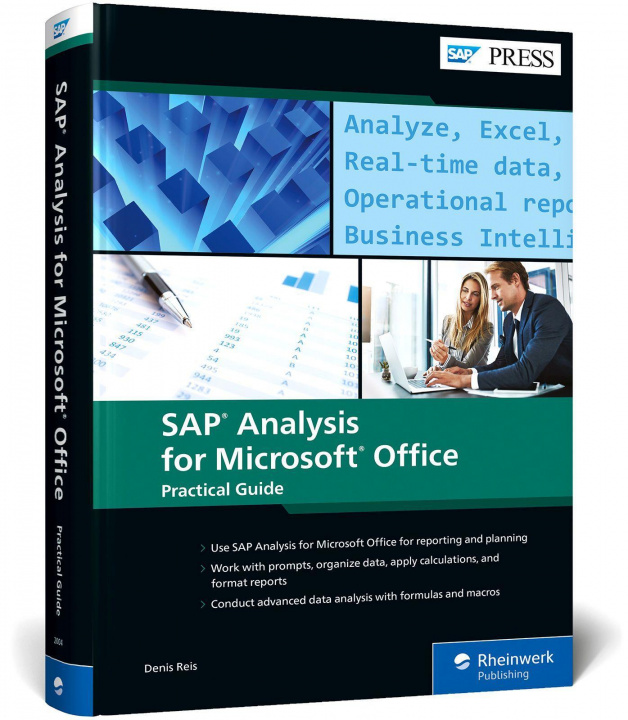
Managing your SAP data in Microsoft Excel? This is your guide to using SAP Analysis for Microsoft Office! Get started with the basics, from creating your first workbook to navigating through reports. Then, follow step-by-step instructions to process data, analyze data, develop planning applications, customize reports, and work with tools such as formulas and macros. Including details on troubleshooting, UI customization, and more, this book is your all-in-one resource! In this book, you'll learn about: a. Reporting and Data AnalysisLearn to work with reports in SAP Analysis for Microsoft Office: define parameters with prompts, adjust formatting and styles, and extend reports with local data. Filter, sort, and display your data using hierarchies, and refine data analysis with simple and advanced calculations. b. Planning Use your SAP data to develop planning workbooks. Plan your data both manually and with functions and sequences. Understand key settings for cell locking, the planning model, and more. c. Advanced FeaturesTake your skills to the next level. Write formulas to use in your reports, and create and use macros in your workbooks, including steps to use API methods, callbacks, and design rules. Highlights include: 1) Workbook creation2) Report navigation3) Prompts4) Data processing, organization, and analysis5) Planning applications6) Report customization and formatting7) Formulas8) Macros9) Configuration10) Troubleshooting


Πληροφορίες για το βιβλίο
Αγγλική

Χαρίστε αυτό το βιβλίο σήμερα
Είναι εύκολο
1 Προσθέστε το βιβλίο στο καλάθι σας και επιλέξτε παράδοση ως δώρο 2 Ως ανταμοιβή θα σας στείλουμε ένα κουπόνι 3 Το βιβλίο θα φτάσει στη διεύθυνση του παραλήπτηΓεια σας! Είμαι ο Libroamiko, ο σύμβουλος βιβλίων σας.
Πώς μπορώ να σας βοηθήσω;